SimpleBlue
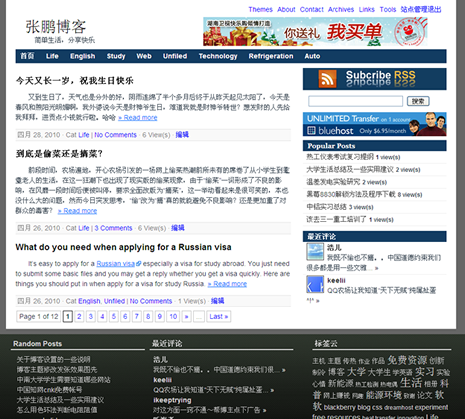
Screenshot
Description:
SimpleBlue is my first free WordPress theme. It’s Widget supported and you can master many styles in the WordPress admin. You can get more details here.
Download Address:
http://wordpress.org/extend/themes/simpleblue
描述:
SimpleBlue 是我的第一款Wordpress免费主题。SimpleBlue主题支持侧栏切可以自选三个位置的侧栏,分别是右侧上部300px款的侧栏、下部140px宽和160px宽的侧栏。更多详细信息查看这里。
下载:
嗯,不错,这款主题整体框架设计还是非常富有个性。
学习中~~
@365hope:谢谢支持,你认为框架设计个性是哪里呢?
我同学也叫张鹏。
对了,我看到你的博客底部是黑色,我觉得不行。
这个色彩搭配不大好看。建议改改。。。
顶部的广告位感觉不错。
WordPress官方有你风格下载地址了吧!
@皇家元林:恩,配色看久了之后我也觉得有点小毛病,只是不知道如何修改了。顶部其实不想放广告,只是空着不知道做什么,或许改版后放RSS feed链接和搜索吧。莫非你是WP主题审核组的?这么快就知道有下载了
呵呵,我才没这么厉害呢!
刚从后台找风格看到的。。。
@皇家元林:呵呵,上传了几次才通过。有没有一点建议呢
呵呵,你太谦虚了
能做出来很不容易了。
我什么都不会,只会用。
我觉得你的背景、和底部的色彩搭配可以修改下。
还有右下角的“上”改为top或者顶部,好像好点,大众化。
呵呵 纯粹我个人意见。见笑了。
@皇家元林:其实我对配色真的不在行,学工科多多少少都有这毛病吧。地步其实是用的_e(‘top’)来展示的,主要是方便不同语言下显示,如果识别为中文就会自动转化为“上”这个字了,确实很不雅……至于空间,我现在才买了不久,还行。说到你的站点,有点杂了,什么都有,论坛、空间出售等,而且域名的解析也很乱的呢,还是做精点吧
嗯 你说的有道理。。呵呵
@皇家元林: 主题又小修了一下,再帮我看看配色?
呵呵 不错啊
现在的配色还好
你的边栏不错。我最近也整个主题,是仿的。
不过刚学 很多都不会 马马虎虎先玩着。
希望可以跟你学点 呵呵
@皇家元林: 呵呵,谢谢夸奖咯。主题最近做了比较大的调整,侧栏可以选择双栏、单栏以及同时显示三种方式,不过官方还没给我通过
@张鹏: 就这个侧边栏 你是怎么可以修改成这样的呀?
教教我啊,我喜欢底下也有的那种。。呵呵
@皇家元林: 效率够高。你是想做成我这种上面是一栏下面两栏的格式?我一会回来,你先加我吧
I really like your theme. Thank you. But the built-in “Bookmarks” are appearing on my site. How do I delete the built in ones or delete “Bookmarks” altogether? Please help ASAP. Thanks
@Shana: I can’t open your URL. Maybe your website is locked in my country.
I think you mean the “Bookmarks” showing on the right sidebar. You can login into your blog and then find the “Links” tab on the left. You will see a “Edit” listed under it. Click on “Edit” and you can delete these bookmarks.
Also, you can change it in “Widget” under the “Appearance” tab. Drag any widget to the “rightsidebar” and it will replace the built-in “Bookmarks”.
Hope you have a happy blogging time with SimpleBlue!
SimpleBlue给我的第一感觉是清爽,靓丽,我很喜欢这款主题。
@cxd44:以为你用上了呢,小小的兴奋了一下,谢谢你的支持。在Wordpress更新了新版,但那边一直没放出来
是你目前使用的版本吗?私下送份给我尝鲜咯,呵呵。
my525100@gmail.com
@cxd44: 不是现在用的这个,现在用的是另外一个主题,我自己用了才几天,之后再放哈。新版的SimpleBlue也就在原来的基础上小改了点,外观效果还是一样的
牛逼的学长
@龙:谢谢支持,你是?
热动的 大三了
@龙:找到这里来了,呵呵
也就装的而已了
where can i add ads on it. and what size ads thay r?
@wordpress-4blog: I have a new SimpleBlue theme which can let you ad you custom ads in sidebar on theme option tab. I have sent it to you via email. If you need add more ads in your blog, you can find wordpress plugin to help you or just come to Google find other ways. You may should edit your theme template.
Where is link download to SEOBox? 🙄
谢谢作者,现在用着感觉非常好
@BABE: It didn’t get approval by WordPress official team. But I can provide you a beta edition if you need it.
@lax: 感谢支持,祝你的站越做越好
@张鹏:谢谢 新版有哪些不同呢 有没有演示哇
@lax:只更新了部分细节,没有大的变化
我在使用simpleblue主题,大爱。
但是请问顶部和文章页的广告如何放置。
另外,我装过分页插件后每一遍文章标题下面都莫名其妙出现|1|2,怎么也去除不了。
文章标题下的|1|2是插件问题,换插件
文章页加广告可以后台编辑content-single.php页,找到如下代码,用广告代码替换下面汉字(评论内容代码请无复制粘贴)
顶部放广告需要较大改动,看样子你还不会弄,会在近期上线新版提供
< div class="entry-content">

文章头部

    < ?php the_content(); ?>

    < ?php wp_link_pages( array( 'before' => '< div class="page-link">< span>' . __( 'Pages:', 'simpleblue' ) . '< /span>', 'after' => '< /div>' ) ); ?>

文章底部

  < /div>